

LenguASR / Documentation
Settings & CVars
The LenguASR Speech component reads its Settings struct when the model loads. To change a setting, unload the model, make your changes and load it again.
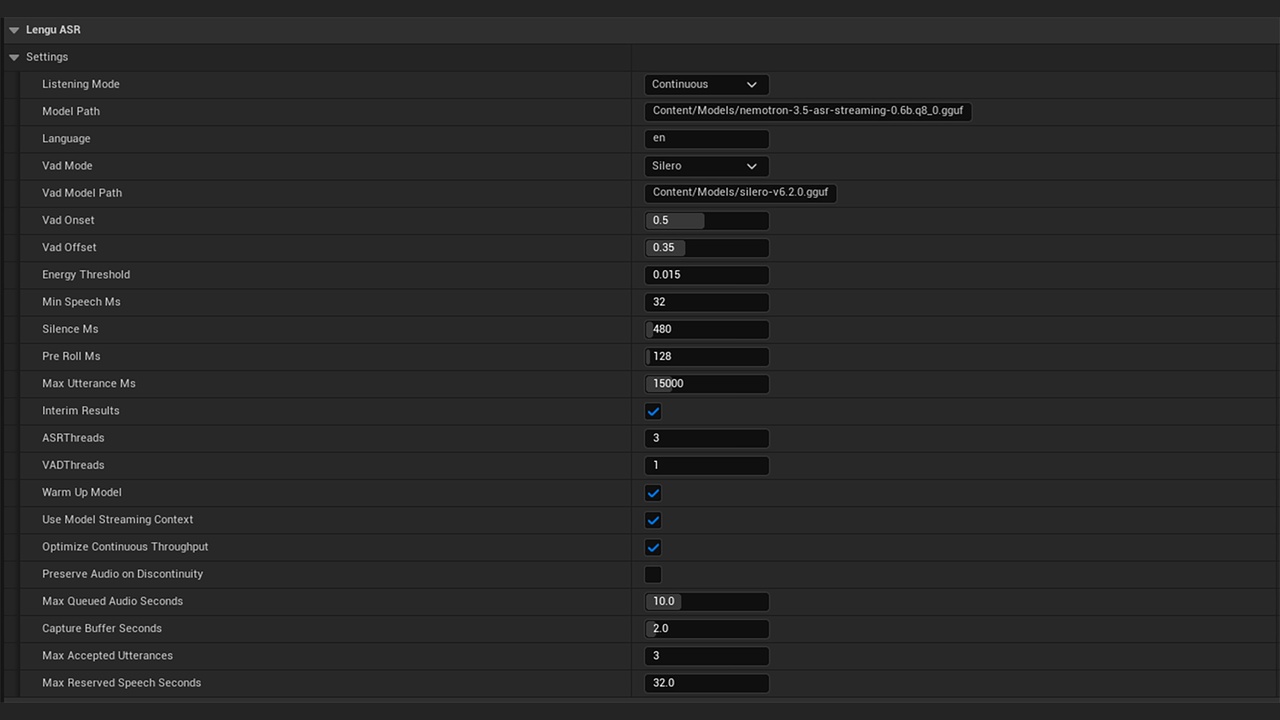
Recognition & models
| Setting | Default | Description |
|---|---|---|
Listening Mode ListeningMode | Manual | • Manual: Streams until you stop it. • Continuous: Automatically detects phrases and decodes audio as it arrives. Use this for always-on input. |
Model Path ModelPath | Content/Models/nemotron-3.5-asr-streaming-0.6b.q8_0.gguf | Points to the ASR weights file. Relative paths start at the plugin directory. You can also use an absolute path. |
Language Language | en | Language code sent to the recognizer. This doesn’t add languages to the model. |
Max Utterance Ms MaxUtteranceMs | 15000 | Maximum phrase length (in ms) before splitting. Must exceed PreRoll + MinSpeech + Silence. Split chunks may produce partial commands. |
Interim Results bInterimResults | true | Enables partial text output. In Continuous mode, partial transcriptions may appear and change before the final phrase. |
Max Queued Audio Seconds MaxQueuedAudioSeconds | 10 | Limits manual-mode raw audio backlog to 1–30 seconds. Exceeding this stops recognition with an error. Continuous mode builds in its own separate limits. |
Voice activity detection (VAD)
| Setting | Default | Description |
|---|---|---|
VAD Mode VadMode | Silero | • Silero: Detects speech via a pre-trained model. • Energy: Uses a volume threshold. • Disabled: Passes all audio (use manual stops or duration caps). |
VAD Model Path VadModelPath | Content/Models/silero-v6.2.0.gguf | The model file for Silero VAD. You can’t use ONNX or other GGML files in its place. |
VAD Onset VadOnset | 0.5 | Required probability to confirm speech onset. Higher = more selective. |
VAD Offset VadOffset | 0.35 | Probability below which silence is advanced. Must be less than or equal to Onset. |
Energy Threshold EnergyThreshold | 0.015 | RMS value for Energy VAD (0.0001–1). Lower accepts quieter audio. |
Min Speech Ms MinSpeechMs | 96 | Sustained speech (in ms) needed to start a phrase (32–2000 ms). Rounded to 32 ms intervals. |
Silence Ms SilenceMs | 480 | Silence duration (in ms) to finalize a phrase (32–5000 ms). Lower values respond faster but split natural pauses more often. |
Pre Roll Ms PreRollMs | 256 | Keeps audio from before speech is confirmed (0–2000 ms). This helps avoid cutting off the first word. |
CPU & initialization
| Setting | Default | Description |
|---|---|---|
ASR Threads ASRThreads | 4 | Number of total inference threads (1–64). More threads can conflict with gameplay. Test on your min-spec machine. |
VAD Threads VADThreads | 1 | Silero uses a separate thread pool (1–64). Usually, start with one. |
Warm Up Model bWarmUpModel | true | Runs a short silent pass before listening. This delays loading slightly but reduces first-phrase latency. |
Use Model Streaming Context bUseModelStreamingContext | false | Experimental longer context that can improve throughput at the cost of partial-result latency. Test on your intended commands. |
Optimize Continuous Throughput bOptimizeContinuousThroughput | true | In Continuous mode, uses the model's larger step (320 ms) to improve performance. Turn this and bUseModelStreamingContext off to compare the 160 ms approach. |
Continuous-mode capacity
| Setting | Default | Description |
|---|---|---|
Capture Buffer Seconds CaptureBufferSeconds | 2 | Raw audio buffer (1–10 s) waiting for VAD triggers. Independent from the ASR queue. |
Max Accepted Utterances MaxAcceptedUtterances | 2 | Max concurrent phrases being processed (1–64). Higher values allow more simultaneous recognition. |
Max Reserved Speech Seconds MaxReservedSpeechSeconds | 32 | Each accepted phrase reserves the maximum utterance length (rounded up in 32 ms blocks). If full, new utterances are rejected. Use On Utterance Rejected to handle such cases. |
With the default 15000 ms maximum utterance time, each slot reserves about 15 seconds. Two slots need about 30 seconds of capacity, which fits within the 32-second default.
Capture recovery
Preserve Audio On Discontinuity (bPreserveAudioOnDiscontinuity) defaults to false.
- false: Discards partially recorded speech if capture is interrupted.
- true: Keeps any received audio even if there's a gap. Missing samples stay missing, and transcripts may merge words across gaps.
Console variables
Below are the plugin cvars. Thread counts and VAD thresholds are component settings.
| Cvar | Default | Description |
|---|---|---|
| lenguasr.PreserveAudioOnDiscontinuity | -1 | • -1: Uses the component setting. • 0: Discards incomplete utterances after a capture gap. • 1: Preserves received audio. Read at model load. |
| lenguasr.LogProgress | 0 | • 1: Logs capture/recognition progress about every 5 seconds. • 0: Disables these periodic logs. Applies immediately, but doesn't log transcript contents. |
| lenguai.PreserveAudioOnDiscontinuity | -1 | Deprecated alias. If maintainer cvar is -1, it reverts to this. Reset both to -1 to follow the component setting. |
Example console commands at runtime (development builds or Editor):
lenguasr.LogProgress 1
lenguasr.PreserveAudioOnDiscontinuity 1
To keep these defaults between sessions, add this to Config/DefaultEngine.ini:
[ConsoleVariables]
lenguasr.LogProgress=0
lenguasr.PreserveAudioOnDiscontinuity=-1
Unload and reload the model after changing gap overrides. You’ll find the logs under LogLenguASRSpeech, using Unreal’s standard log verbosity rules.
AVX2 selection
Your build determines whether the plugin can use AVX2. It follows Unreal’s MinCpuArchX64 setting:
- None or AVX - Plugin loads the baseline runtime.
- AVX2 or higher - Plugin attempts AVX2 acceleration if the CPU and OS support it.
Older CPUs without AVX2 can only run the baseline runtime. To force the plugin to use that runtime, add this to your target’s GlobalDefinitions and rebuild:
GlobalDefinitions.Add("LENGUAI_FORCE_DISABLE_AVX2=1");This won’t make an engine or game built for AVX2 run on a non-AVX2 CPU.
In Continuous mode, an utterance can be both waiting for the endpoint (bWaitingForEndpoint) and decoding (bDecoding). Count it only once using AcceptedUtterances. LastDecodeSeconds excludes time spent waiting for more microphone input.
Support
Need help?
Send us your engine version, CPU, microphone, listening mode, relevant settings and LenguASR logs.